
Adding a security deposit is a fast and flexible way to increase your total credit limit.
Your deposit is refundable, held securely as collateral, and increases your available spending power on a 1:1 basis.
In this article:
- How a security deposit works
- How to add a deposit
- What if I don't have a Keep CAD account?
- What happens after your request
- Frequently asked questions
Before you get started: Your total credit limit is made up of your unsecured credit limit (set by underwriting) plus your secured credit (your deposit). Every dollar you deposit increases your total limit by one dollar. The maximum security deposit is $5,000.
How a security deposit works
When you add a security deposit, Keep holds the amount as refundable collateral. In return, your secured credit limit increases by the same amount immediately.
Example: If your unsecured credit limit is $10,000 and you add a $5,000 deposit, your total credit limit becomes $15,000.
Your deposit is always yours. You can withdraw it at any time, subject to any outstanding balance on your card.
How to add a deposit
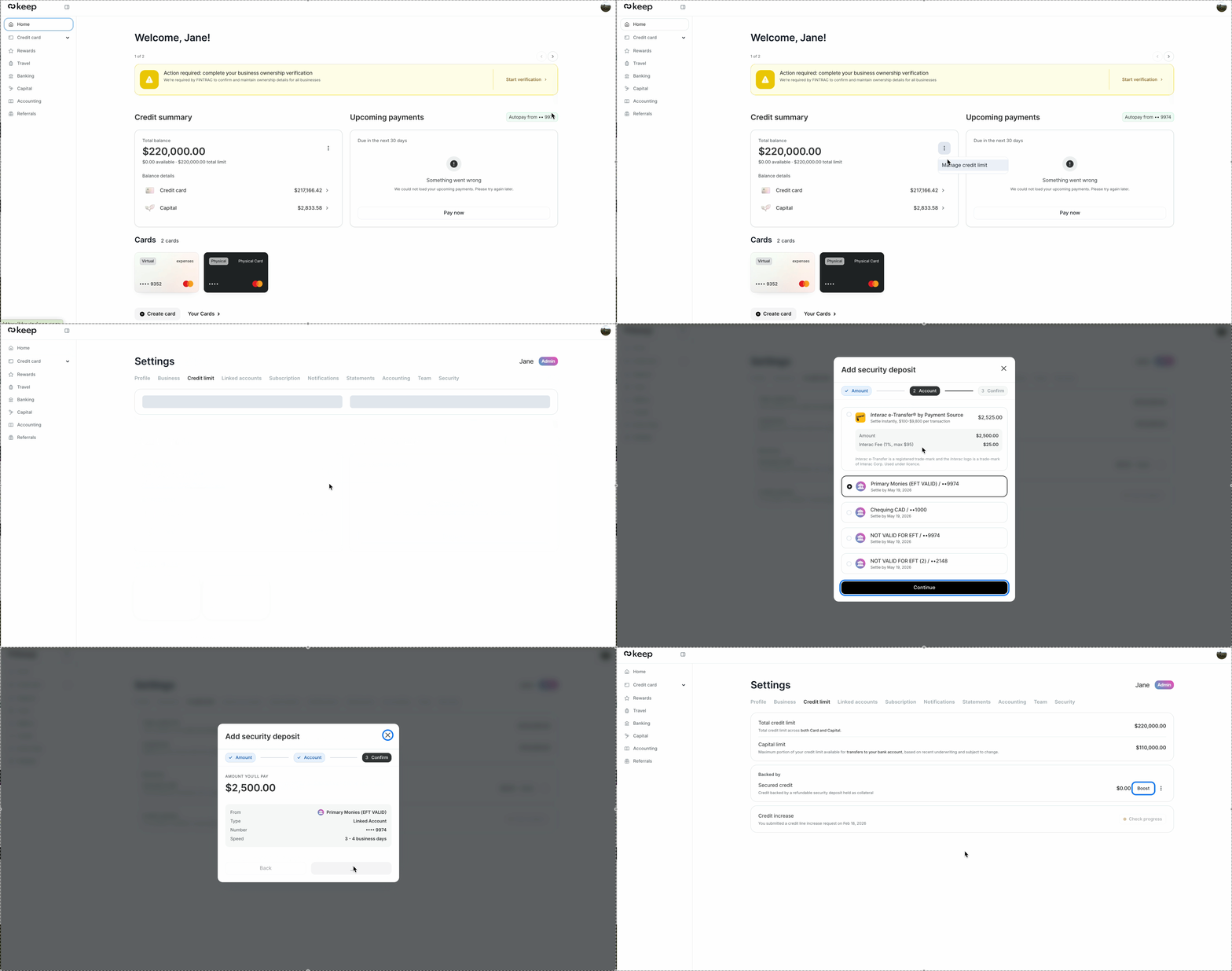
To add a security deposit:
- Go to Home from the left-hand navigation.
- Find the Credit summary card and click the three-dot menu in the top-right corner.
- Select Manage credit limit. You’ll be taken to Settings > Credit limit.
- Under Backed by, find Secured credit.
- Click Boost next to Secured credit.
- Enter the amount you want to deposit (maximum $5,000).
- Select your payment method:
- Interac e-Transfer — settles instantly. A 1% fee applies (maximum $95).
- Linked bank account (EFT) — settles in 1–4 business days. No fee.
- Click Continue, review the summary, and confirm.
💡 Don't have a Keep CAD account? Your security deposit is held in a Keep CAD account. If you don't have one yet, you'll be prompted to open one at step 5. See What if I don't have a Keep CAD account? below for what to expect.
What if I don't have a Keep CAD account?
Your security deposit is held in a Keep CAD banking account. If you haven't opened one yet, clicking Boost will trigger a prompt to open an account before you can proceed.
Here's what happens:
- Click Open an account on the prompt.
- Answer a short question about the intended use of your Keep account.
- Keep will review your application and get back to you within 1 business day. You'll receive an email with details on what to provide if anything else is needed.
- Once approved, return to Home > Credit summary > three-dot menu > Manage credit limit and click Boost to complete your deposit.
If your banking account application is declined, adding a security deposit will not be available at this time. Contact us at support@trykeep.com for more information.
What happens after your request
Once your deposit is confirmed:
- Your secured credit limit increases by the deposited amount.
- Your total credit limit (shown in Home > Credit summary) updates to reflect the new total.
- The funds are debited from your chosen payment method.
You'll receive a confirmation once your new limit is active. Timing depends on your payment method: Interac e-Transfer is instant, while EFT takes 3–4 business days.
Frequently asked questions
Is there a minimum or maximum deposit amount?
The maximum security deposit is $5,000. The deposit must be funded from a verified linked bank account.
How quickly does my limit increase?
It depends on your payment method. Interac e-Transfer settles instantly. Linked bank account (EFT) takes 1–4 business days. Your limit updates once the deposit is confirmed.
Is my deposit safe?
Yes. Your deposit is held securely as collateral and is fully refundable. It is not used by Keep for any other purpose.
Can I add more to my deposit later?
Yes. You can increase your deposit at any time by going to Home > Credit summary > three-dot menu > Manage credit limit and clicking Boost next to Secured credit.
Can I get my deposit back?
Yes. Your deposit is fully refundable. To withdraw it, go to Home > Credit summary > three-dot menu > Manage credit limit, click the three-dot menu next to Secured credit, and select Withdraw. See How to withdraw your security deposit for full details.
Need more help?
If you have any questions, contact us at support@trykeep.com. We're happy to help!